
Jul 282010
 

Kindle 3

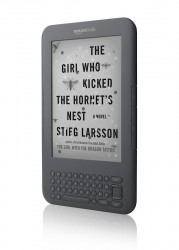
Amazon today announced the new Kindle 3, and it’s quite an improvement. The price for the 3G model remains at $189, and the new Wi-Fi only model is only $139 (narrowly edging out B&N’s new $149 Nook Wi-Fi). They should be available August 27, and both include free 2-day shipping.

The $189 3G + Wi-Fi model ads Wi-Fi connectivity to the free, lifetime 3G wireless coverage of the Kindle 1 and 2 models. Both new models have:

  • 50% better screen contrast (darker black and a lighter gray background), with E-Ink’s new “Pearl” display (also used on the graphite Kindle DX 2).
  • A choice of graphite (pictured) or white casing. The graphite may make the screen background seem lighter.
  • Smaller size and lighter weight: with the same 6″ screen, the new Kindle 3 is 21% smaller and 15% lighter — only 8.7 oz (3G) or 8.5 oz (Wi-Fi).
  • 20% faster page turns.
  • Double the internal storage, now 4GB (enough for about 3,500 books).
  • An even longer-lasting battery; Amazon claims a full month with wireless off and 10 days with wireless on.

This is really a killer list of features. What strikes me is that they took what the Kindle was already great at, and made it even better. As the owner of a Kindle 2, I can attest that the device is already small and light enough for easy one-handed reading — it’s as light as most paperbacks. Now, it’s even smaller and lighter: only 1/3rd of an inch thick and about half a pound. And the battery life was already phenomenal — I’d get 2 or 3 weeks out of it — but a full month without recharging is absurd. The page turns were also fast enough (about 1/2 a second) so they weren’t obtrusive, but faster is even better. And the extra storage is also nice, although 2GB is more than enough for most users: not only can you hold thousands of books, but you can always back up extras on your computer and Amazon backs up all your purchases through the “cloud,” so you can delete them to free up space and can always re-download them when necessary.

They’ve also made important improvements in areas that could use them: the contrast of the screen, for example. If I had one gripe about my K2, it’s that the background looks more like the gray, newspaper-like paper of mass-market paperbacks than the clean white paper in higher-quality trade paperbacks. I haven’t seen it myself, but the new “Pearl” display is supposed to be a slightly lighter shade of gray.

Additionally, they changed around the layout and button placement a bit: mainly, they’ve redesigned the 5-way controller, added “home” and “back” buttons, removed the number keys (you now have to hit ALT + the top row buttons), and re-designed the next page and previous page buttons (supposedly making them quieter as well). There will also be three user-selectable fonts (with, of course, the existing 8 font sizes), support for Asian language fonts, and software improvements including a better web browser, text-to-speech on menu items (for better accessibility), and support for notes and the built-in dictionary with PDFs.

I think it’s also a great move to make a lower-cost model: the Kindle Wi-Fi for just $139. This was partially to compete with B&N’s $149 Nook Wi-Fi, and it makes the new Kindle 3 very affordable — it’s several times less expensive than Apple’s $499 iPad. Consider that the original Kindle was $399, and the Kindle 2 was still $259 just a few months ago, and you can see how aggressively they’ve driven the prices down. It makes the value proposition that much better, as anyone who reads more than just occasionally can almost certainly recoup the cost of the device through the fact that e-books are generally less expensive than hardcovers or paperbacks — and many great, classic e-books are free. It doesn’t take very many free and $2.99 e-books (compared to $10 paperbacks, let alone $25 hardcovers) to recoup the initial cost of the device. And the extra $50 for the 3G model seems quite reasonable, considering that it includes free, lifetime, global 3G wireless (compared to $30 a month on the iPad 3G!).

I think Amazon did a great job with this update. I wasn’t expecting so many features — just the graphite casing (ho-hum) and Pearl screen (which is nice). Now I’m a little jealous… 😉

 e-readers  Comments Off on Kindle 3 Announced: 3G for $189, Wi-Fi for $139

My Favorite Things

 Posted by at 10:48 PM  Tagged with: , ,
Jul 242010
 

I’ve been meaning to start reviewing some books and movies that I enjoy on this blog, which has so far mostly concentrated on e-book news, e-book readers, and changes in the publishing industry. While I’m still passionate about those things, I’d also like to help spread the word and review other books I’ve been reading and particularly good movies I’ve seen. Sadly, in finishing my latest book (and editing, formatting, promoting, blah blah), I haven’t had much time for reading, but I plan to get back to it soon.

Until then, I just felt like highlighting some of my all-time favorite books and movies (and a TV show thrown in for good measure). Perhaps these will give you a feel for my tastes and inspiration as a writer, or maybe they’ll just help you pick your next book or movie to rent. So, here are some of my favorite things:

Books

  1. The Hitchhiker’s Guide to the Galaxy series, by Douglas Adams: I’ve read this series of books cover-to-cover at least 5 times. Hilarious, witty, irreverent, poignant, and sometimes just plain silly, this book always manages to make me laugh. Aside from writing about funny situations and ideas, Adams was the greatest at using language itself to make me laugh; he wrote about funny things in a funny way. Some of his dialogue was pure genius. I’m saddened that he left us far too soon.
  2. Lamb, by Christopher Moore: Another example of great humor writing, Lamb was so sacrilegious, it probably would have started a new round of Crusades, except it had all the zealots doubled over and howling in laughter. It chronicles “the missing years” of Jesus Christ’s young adult life, and tells the story of his childhood companion, Biff. A taste: as Moore re-tells the famous story of the adulteress (inviting “he who is without sin to cast the first stone”), Biff gallantly volunteers to see the nice lady home safely. Jesus gives Biff a disapproving look that probably only the Son of God can really pull off. As Biff sulks away from the departing woman, he laments that “it just seems like such a waste of a perfectly good adulteress.” Comedy gold.
  3. The Conqueror’s Trilogy, by Timothy Zahn: This series hooked me in with a stunning scene of first contact with an alien species — which served as inspiration for the start of Right Ascension — and continued to explore fascinating ideas regarding assumptions we’d make about a new species and how changes in ability or technology could radically reshape an entire civilization and their viewpoint. The first book is from the humans’ point of view, the second from the aliens’, and the third goes back and forth. Zahn’s characterization and the depth of the alien society he created made it seem as if he had visited this alien place and come back to report on it, instead of inventing it in his mind. I could just as easily recommend his Thrawn series (set in the Star Wars universe) or many of his other excellent novels.

Honorable Mentions: The Incarnations of Immortality series by Piers Anthony, Memoirs of a Geisha by Arthur Golden, and anything by Dave Barry.

Movies

  1. Forrest Gump: This is the movie I’ve watched more than any other. I probably saw it about 100 times in college, to the point where I could recite every line, and knew obscure trivia like dollar amounts or all the different ways you could prepare shrimp. Partially from overload, I haven’t seen it in years now, but I was still moved by the story and how the title character overcame obstacles and made his place in the world.
  2. The Shawshank Redemption: I was surprised to learn that this movie was based on a novella by Stephen King, Rita Hayworth and the Shawshank Redemption. I found this movie to be powerful, moving, and it contained the perfect combination of outstanding acting (Morgan Freeman and Tim Robbins), phenomenal directing, and a superb musical score. This may be the only movie I enjoyed more than in book form — which I’m sure was only possible because they fit all the essential stuff from the novella into the movie, which is impossible with longer novels.
  3. Gattaca: An underrated but intelligent and thought-provoking science fiction story about genetics and genetic testing gone awry. It explored questions regarding how much of our lives is determined by genetic factors, the morality of using genetics to screen for jobs or social status, and how the indomitable human spirit can overcome all obstacles (notice the parallels to Forrest Gump). Particularly relevant now as our understanding of science and genetics rapidly advances, this movie wasn’t so much sci-fi as “here’s a taste of some issues you’ll be dealing with in 5 or 10 years.”
  4. Serenity: Oh man, just don’t get me started on Firefly, the foundation for Serenity and the best TV show of my generation, which was cancelled in less than a season so they could squeeze in another version of Surviving the Amazing Apprentice Race with Real Kardashian Housewives. The TV series and movie were witty, well-written, and starred a great cast with phenomenal chemistry, led by Nathan Fillion, who I’m happy to see doing well on one of my favorite recent shows, Castle.

Honorable Mentions: Several of the Star Trek: The Next Generation movies (and TV series), Top Gun (hey, all males my age liked that movie when it came out!), and Rain Man.

So, there you have it, some of my all-time favorite books and movies. Please don’t read too much into the exact order, the point is just that I very much enjoyed and highly recommend everything on this list.

 reviews  Comments Off on My Favorite Things
Jul 222010
 

To follow up on my earlier post about print-on-demand paperback self-publishing options, here is a primer to help you create, format, upload, and distribute your writing in e-book format. The best part is that the process I detail below is 100% free. Always be wary of anyone charging you money in relation to publishing your book — not that it’s never a good idea to get some professional help, but you should know exactly what you’re paying for and whether it’s worth it.

The down side to spending zero money on your e-book is that you have to do all the work. Cover design, editing, formatting, uploading, promoting, etc. Don’t expect to spend an hour and have a nice-looking, professionally-formatted e-book. I’ve spent many, many hours getting my e-book files just right (ensuring proper indents, special characters, interior images, and tables of contents in various electronic formats). Hopefully, my experience can save you some time.

The first thing you’ll need is a novel (or short story) in electronic format, probably in Microsoft Word. For purposes of creating an e-book, you generally want to strip out all the fancy formatting you might use in a printed book: get rid of fancy fonts (just put everything in Times New Roman), strange indents or block quotes, and weird symbols. You can keep bold and italics, and smart quotes and em dashes should translate properly, although they sometimes cause problems. It’s generally better to use first-line paragraph indents in Word (instead of hitting the tab key — and never use spaces to indent paragraphs). Do not leave blank lines between paragraphs, since some e-book readers add them and you’ll end up with triple spacing! The basic rule is: the simpler, the better. Various e-book readers will display your text in different ways, and users can adjust font sizes at will, so just forget about the idea of controlling every aspect of how the text will look and where pages within a chapter break (like you would in a printed book), and keep the formatting clean and simple. Do not use multiple line breaks, those look terrible on the screen — use a blank line and a row of asterisks to indicate chapter or section breaks instead.

The second thing you’ll need is a front cover, which should be in 2:3 ratio. It should be at least 800 pixels tall, although you’ll be using the same image (along with a spine and back cover) if you make a paperback, and that requires at least 300 dpi, so it’s best to make it high-resolution to begin with (1800×2700 pixels for a 6×9 paperback). Any interior art (like an “about the author” photo) should be black and white and at least 150 dpi. The less interior art, the simpler it will be.

Amazon

Amazon is the most important e-book distributor; it still probably accounts for somewhere between 50% and 80% of all e-book sales. You publish e-books to the Amazon Kindle store using Amazon’s free Digital Text Platform (DTP) service at dtp.amazon.com. There, you can enter info about your book (author name, description, price, etc.) and upload your e-book cover and interior file. Amazon pays either 35% or 70% royalties; there’s more info in my recent post here.

You can upload the interior file in MOBI (the Kindle’s native format), or DTP will convert it for you if you upload an HTML or Word file. MOBI is best; HTML should be OK, Word is iffy. You can create MOBI files using the free Calibre (Mac or PC) or MobiPocket Creator (PC only) programs. A full MOBI or HTML tutorial is beyond the scope of this blog post — but see below for an easier, non-technical solution.

Smashwords

You’ll probably also want to upload your e-book to the free Smashwords e-book seller/distributor service. Smashwords sells e-books through its own website, but also will distribute them for you to be sold on B&N.com, Kobo, Sony, and the Apple iBook Store. They charge nothing up front, but they take a 15% cut of royalties.

Smashwords has an excellent free Style Guide that will help you prepare your Microsoft Word document for upload. It basically explains how to do what I said above: simplify and clean up your Word document, remove line breaks and extraneous formatting that translates poorly to e-books, etc. You can then upload your Word file and Smashwords will convert that file to all the e-book formats you need, including MOBI and ePub.

The Easy Way

The simplest way to get your e-book distributed as widely as possible and looking pretty good is to: (1) read and follow the Smashwords Style Guide, (2) create a Word document with simple, clean formatting, (3) upload that Word document to Smashwords and let them convert it for you, and (4) take the MOBI file that Smashwords creates and upload it to Amazon’s DTP. You should end up with a nice-looking e-book, and it will be available on Amazon and all the major e-book sellers.

The Perfectionist’s Way

Some of us, especially after you start selling more than a handful of copies, want to craft the most pristine, best-looking, and most full-featured e-books possible. It’s a lot of work and takes a lot of time and effort and research (it’s also beyond the scope of this blog post). But it’s possible to create a proper cover, page breaks, special formatting, interior photos or artwork, a table of contents, and other useful e-book features. This involves creating an HTML file, which is trickier than it sounds, since Word’s “Save As HTML” produces code that needs a significant amount of manual cleaning up. That HTML file is then fed into an e-book creation program (like the two I mentioned earlier) and tweaked to produce a MOBI file that can be directly uploaded to Amazon, and that should retain all your exact formatting and features.

Conclusion

Basically, the aspiring e-book publisher (make no mistake: if you’re doing this yourself, you now become a publisher, not merely an author, and must take on all the duties of a publisher) has three choices: (1) go with a simple, clean e-book that will be OK but not spectacularly formatted, (2) spend a lot more time and effort producing perfect MOBI (and possibly ePub) files, or (3) hire a professional to format the e-book for you. Which option you select (I went with #2) depends on your budget, your technical ability, how much time you have, and how many e-books you realistically expect to sell.

Jul 202010
 

I’m pleased to point you over to the blog of fellow indie author Debra Martin, who runs the Two Ends of the Pen blog, where she conducts author interviews and relays e-book news. Debra was kind enough to invite me to be interviewed for her blog, and I really enjoyed the creative questions and the interesting responses they evoked. Here’s a snippet:

Finally, one agent asked for a few more chapters, then the first 100 pages, then the whole manuscript, and then even offered to represent me! I went out and celebrated with my friends, drinking more than was strictly good for me, and then the next morning I actually did some research on this agent. In my hungover state, I learned that the agent had a terrible reputation in the industry, and didn’t have any successful clients to speak of. That was not a happy morning.

Head on over and check out my interview and the rest of Debra’s blog here:

http://twoendsofthepen.blogspot.com/2010/07/interview-with-david-derrico.html

And a big thank you to fellow indie author Nick Spalding, author of Life … With No Breaks. His new Spalding’s Racket blog highlights work by other independent authors — take a look here:

http://spaldings-racket.blogspot.com/2010/07/right-ascension-by-david-derrico-sci-fi.html

 press  Comments Off on Two Ends of the Pen & Spalding’s Racket
Jul 192010
 

Amazon announced today that their e-book sales have overtaken hardcover sales. The numbers are actually quite staggering: for the latest quarter, Amazon sold 143 e-books for every 100 hardcovers they sold. The numbers for the past month are even more impressive: 180 e-books for every 100 hardcovers — nearly double. Even more impressive is that they aren’t juicing the numbers, as they are not including free e-book downloads (like Apple probably did), and are even including hardcover sales where there is no corresponding Kindle version. Wow.

A few other tidbits:

  • Amazon’s e-book sales from the first half of 2010 were triple that of the first half of 2009.
  • Amazon exceeded the impressive industry sales stats I mentioned yesterday of 163% increased sales year-over-year in May, and 207% year-to-date.
  • It was recently announced that James Patterson was the first author to sell a million e-books, 1.14 million, to be exact. Of those, Amazon sold 867,881 of them (over 76%).
  • The growth rate of Kindle sales has tripled since the recent price drop from $259 to $189, and have increased each month in the quarter (April, May, and June). Perhaps now we can stop hearing about how the iPad (released April 3) will “kill” the Kindle?

One interesting note is that Amazon didn’t specify how many of its e-book sales are through the Kindle for iPad app. But considering that Kindle 2 unit sales have been increasing each month, and that the Kindle is better suited for hard-core readers than the iPad, I doubt that Kindle book sales on the iPad were more than a minor percentage.

Either way, very impressive numbers that paint a very positive outlook for e-books and readers.

 Amazon, e-books  Comments Off on E-Books Out-Selling Hardcovers at Amazon
Jul 172010
 

I’ve just spent the day trying to figure out why my latest novel, The Twiller, hadn’t been uploaded to the Apple iBook Store through Smashwords, even though I had uploaded it over a month ago. Mark Coker was kind enough to email me back and let me know that the ePub file (which Smashwords’ “Meatgrinder” automatically generates from a Microsoft Word .DOC file that I upload) wasn’t passing the dreaded “epubcheck” utility. And Apple doesn’t accept e-books that don’t pass epubcheck.

After a good amount of research and frustration, I thought I’d share my findings (and simple solution!) here in the hopes that another author might stumble across this and save some time.

The errors that epubcheck was returning were:

ERROR: the-twiller.epub/tmp_03d606bf0366e819944069e10952257f _Mh81jI.fixed.tidied.xfixed_split_000.html(12): bad value for attribute “name”

ERROR: the-twiller.epub/tmp_03d606bf0366e819944069e10952257f _Mh81jI.fixed.tidied.xfixed_split_000.html(33): bad value for attribute “name”

(These were repeated several times, for each chapter or section in my e-book.) By opening the ePub file in Sigil, I was able to figure out that line 12 of each section was the “Author” attribute, and line 33 was an attribute called “Matter No.” The simple fix involves opening your Word document and clicking on File ——> Properties. Somehow, the “Author” name was set as “( )”, which epubcheck didn’t like. So make sure at least your title and author name are filled in, and they should probably be only letters (no weird symbols).

The second attribute, “Matter No.” appeared under the “Custom” tab of Word’s Properties window. For some reason, Word had added a whole bunch of custom fields into the document, including “Matter No.”, which I don’t think epubcheck liked due to the period. Maybe I had opened some legal document that had all those weird legal fields added, and Word saved them (I told you being a lawyer was frustrating!). Anyway, I removed all of these custom fields by highlighting them and clicking “delete.”

Since I didn’t have this problem with my first two e-books, and I recently “upgraded” (yes, I use the term loosely) from Word 2004 for Mac to Word 2008 for Mac, I figure that might be the culprit. In any event, fortunately, the solution is simple — just tidy up the “Title,” “Author,” and any custom fields your document has under Word’s “Properties…” dialog in the “File” menu.

I just uploaded the new version to Smashwords, and it passed epubcheck, so it will hopefully show up in the Apple iBook Store soon!

UPDATE: That did the trick! The Twiller is now available in the Apple iBook Store. 🙂

 Uncategorized  Comments Off on Formatting for Smashwords and ePubCheck

May 2010 E-Book Sales: $29.3M

 Posted by at 5:47 PM  Tagged with: ,
Jul 162010
 

May 2010 e-book sales: $29.3M

May 2010 e-book sales data is in from the Association of American Publishers, and they are up 162.8% over last May, totaling $29,300,000 for May 2010. Year-to-date, e-book sales are up 207.4% from Jan – May 2009.

The most interesting tidbit is that, at this time last year, e-books comprised 2.89% of all trade book sales. This year so far, they’ve almost tripled, up to 8.48%. That’s not only a huge jump, but we’re really starting to approach very significant percentages (to put that in perspective, New York & Massachusetts combined account for 8.42% of the U.S. population). Some popular books are seeing even higher numbers — e-books accounted for almost 30% of the first-week sales of the #1 NYT Bestseller The Girl Who Kicked The Hornet’s Nest. Those numbers are even more impressive when you consider they’re measuring dollar figures, and e-books generally cost less than paper books, so e-books’ percentage of total copies sold would be even higher.

The monthly e-book sales numbers so far this year:

  • Jan 2010: $31.9 M
  • Feb 2010: $28.9 M
  • Mar 2010: $28.5 M
  • Apr 2010: $27.4 M
  • May 2010: $29.3 M

I was surprised to see even the small dips in March and April, but May appears to be back on the upswing. Perhaps e-book sales are stronger over the winter when people would rather curl up with a good e-book than brave the snow to head to a bookstore. But, for comparison, the first 5 months of 2010 total $146M, whereas the total for all 12 months of 2008 was only $56.5M.

Please see this older post for earlier numbers and a more detailed breakdown on e-book sales vs. hardcover, trade paperback, and mass market paperbacks.

Amazon and 70% Royalties

 Posted by at 7:58 PM  Tagged with: , ,
Jul 082010
 

The big news this month for independent authors and publishers is that Amazon has unveiled a new 70% royalty option for e-books published directly through their DTP service. (The old rate was 35%.) Doubling the royalty percentage is a big step (and matches what Apple offers in its iBook and App stores), but there a few catches; to qualify, books must:

  • Be priced between $2.99 and $9.99
  • Be priced at least 20% less than the cheapest print version
  • Enable text-to-speech
  • Be made available in all worldwide territories where the publisher/author has rights

There are a few other important differences: first, your list price must be the same across all sales channels, so you can’t list a book for $2.99 on Amazon but $1.99 on Barnes & Noble or your own web site. Second, books sold at the higher royalty rate receive 70% of the SALE price, not the list price you set, and Amazon checks other retailers and will discount your titles to match the lowest prices it finds elsewhere. B&N and Kobo both customarily discount e-books by 20%, and if Amazon matches those prices, you will only get paid 70% based on the discounted price. Finally, Amazon now deducts 15 cents per MB, based on the file size of your book (most books are about 368K, so this is only about 5 cents).

Authors can choose either the 35% or 70% option, and can switch back and forth.

There have been a few hiccups: most indie authors’ books show up on B&N, Kobo, Apple, and Sony through a distributor called Smashwords, and updating the price at Smashwords can take weeks or months to trickle down to the retailers (The Twiller JUST went up on B&N three weeks after release, and isn’t up elsewhere yet; Right Ascension took eight months to hit Sony). So, you could change the Amazon price (which takes 1-3 days), and Amazon may de-list your book because there’s a lower list price elsewhere. Also, other retailers may decide to discount your book (we have no control over this), and that would affect your Amazon price and how much they paid you in royalties.

Due to these and other delays, Amazon hasn’t yet updated the price of Right Ascension to $2.99, but it should be done shortly.

Nonetheless, these details should be ironed out soon (the e-book revolution / indie author resurgence is new territory for everyone, after all), and earning $2.05 on a $2.99 e-book compares very favorably to earning $0.35 per sale (at 35% of $0.99), or even the $0.50 – $0.80 most traditional authors earn on an $8.00 paperback. This new system at least allows talented indie authors a chance to earn a living writing books, and possibly to improve them by paying for cover design, proofreading, or formatting help. I would like to live in a world where authors who are very good at writing novels are compensated enough to continue to hone their craft and write more books for me to enjoy. As a reader, I’d rather they earn a living writing than go write ad copy or do something else to pay the bills, and I consider $2.99 a very reasonable price to pay for a high-quality e-book. I think it’s a win-win for readers and authors, and I’m excited to see if the general public agrees.

 Amazon  Comments Off on Amazon and 70% Royalties
Jul 012010
 

Woot! Just $150!

If you’re quick about it, you can grab a new Kindle 2 at woot.com for just $149.99 (plus $5 shipping). But if you’re interested, I’d act fast since (a) they’ll probably sell out quickly, and (b) Woot.com is known for “One Day, One Deal,” and they have a new deal up each day at midnight (Central time). So this deal will only last until the end of today (July 1) at the latest.

Considering that the Kindle was $259 just a week or so ago, and is currently $189 at Amazon, this is a pretty phenomenal deal. Remember, the price includes free 3G wireless coverage (for e-book downloads and basic web browsing) for life. If you’re an avid reader, or know one with a birthday coming up, this post is for you.

Apparently, Amazon bought Woot.com yesterday, and this is how they chose to celebrate.

P.S.: In somewhat related news, the larger Kindle DX 2 was also announced today, with a graphite casing, better screen contrast, and a price cut down to $379.

UPDATE: It sold out 5,000 units in only 8 hours! But Amazon has been listing refurbished K2s for only $109 lately … but they sell out quickly at that price as well.

 Amazon, news  Comments Off on Kindle 2 Just $150 at Woot Today Only